Let’s be honest: The Super Bowl is more than just a football game. It’s a massive party. Whether you are tuning in for the touchdowns, the halftime show, or just to see the funny commercials, the whole world wants to watch.
But if you live outside of the United States, watching “The Big Game” can be a nightmare. You usually have two bad options: pay for an expensive TV subscription you don’t want, or try to find a blurry, illegal stream that keeps freezing.
There is a better way. You can watch it legally and for free using Tubi TV.
The only problem? Tubi works best in the USA. If you try to open it from Europe, Asia, or South America, you might get blocked.
Don’t worry. This guide will show you exactly how to fix that using a device called the Deeper Network.
The “Free” Solution: Tubi TV
Tubi is an amazing streaming service owned by FOX. It has thousands of movies and TV shows, and yes—it is completely free. You don’t even need a credit card.
According to Tubi’s official guide, they stream the Super Bowl for free. But they check your location. If you are not in the US, the door is locked. We just need a key to open it.
The Key: Deeper Network (Better Than a VPN)
To trick Tubi into thinking you are in the US, most people buy a VPN software subscription. But those have monthly fees, slow down your internet, and streaming sites often block them.
This is why the Deeper Network is a game-changer.
It is a small device (hardware) that you plug into your router. Here is why it’s better:
- Pay Once, Free Forever: You buy the device once, and you never pay a monthly fee again.
- Blocks Ads: It stops intrusive pop-up ads before they appear on your screen.
- Plug and Play: It works on everything—your phone, laptop, and even your Smart TV.
Understanding Your Settings: Smart Route vs. Full Route
Once you have your Deeper Network device, you will see two main options. People often get confused here, so let’s make it simple.
Option 1: Smart Route
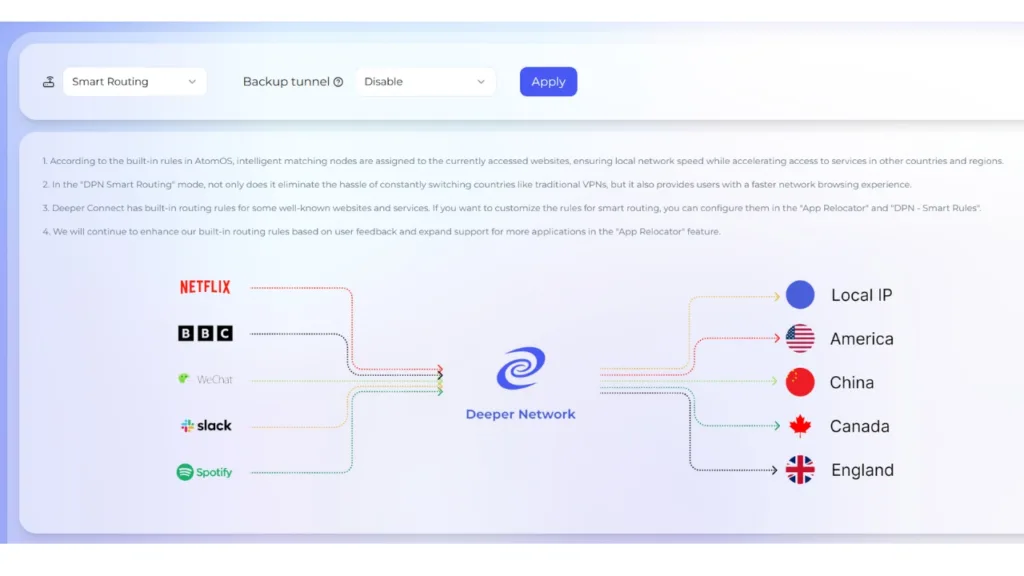
This is the smartest way to use the internet. The device acts like a traffic cop.
- It sends only your streaming traffic (like Tubi) to the USA.
- It keeps your other traffic (e.g., WhatsApp, local news, or food delivery apps) within your country.
- Why use this? It lets you watch the game in the US while ordering a pizza from down the street on the same Wi-Fi.
Option 2: Full Route
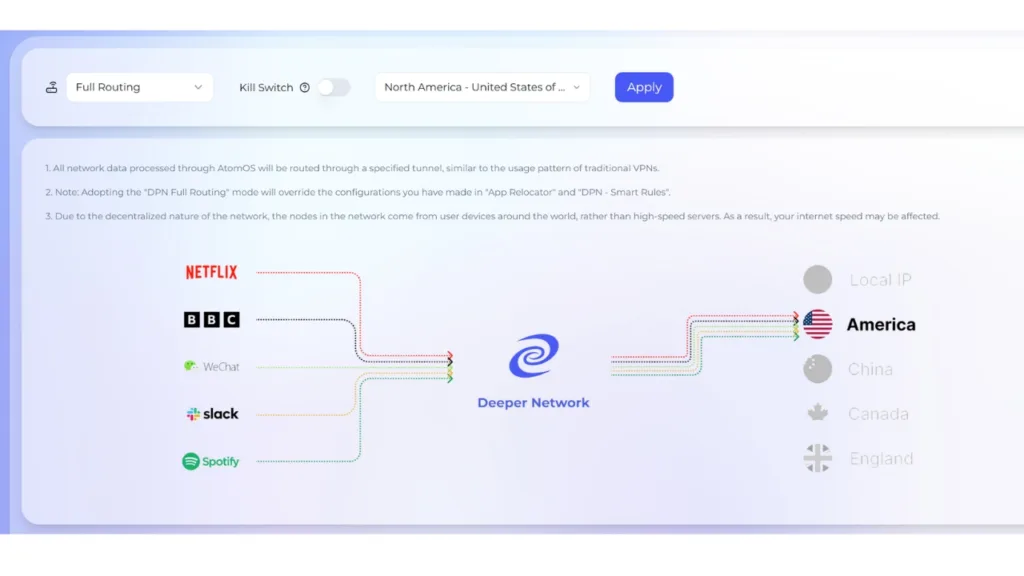
This is the heavy-duty option. It sends everything to the USA.
- As far as the internet knows, your entire house has moved to America.
- Why use this? Use this if Tubi is being stubborn. If Smart Route isn’t working, switch to Full Route to force the connection.
Step-by-Step: How to Watch the Game
Follow these easy steps to get ready before kickoff.
Step 1: Plug It In
Connect your Deeper Network device (Mini, Pico, or Air) to your router. It’s very easy to set up.
Step 2: Choose Your Route
Go to your device dashboard (AtomOS) on your computer.
- Recommendation: Start with Smart Route. Go to the “Domain Config” section and type in tubitv.com. Set it to use the North America/USA tunnel.
- Backup Plan: If the video doesn’t load, switch your mode to Full Route (North America). This works 100% of the time.
Step 3: Go to Tubi
Open the Tubi app on your Smart TV or visit TubiTV.com. The “Content Unavailable” message will disappear.
Step 4: Enjoy!
Sit back, relax, and enjoy the Super Bowl in high quality for free.
Frequently Asked Questions (FAQ)
Can I really watch the Super Bowl for free on Tubi TV?
Yes! Tubi TV is 100% free and legal. They do not ask for a credit card or a subscription fee. However, the Super Bowl stream and most live sports content are usually restricted to viewers inside the United States.
How do I watch Tubi TV if I am outside the USA?
You need to make your internet connection appear to be coming from the US. While regular VPN apps are often blocked, a hardware device like the Deeper Network works reliably. It routes your traffic through a US tunnel, allowing you to unlock Tubi from anywhere in the world.
Why should I use Deeper Network instead of a monthly VPN?
There are three main reasons:
Cost: You pay once for the hardware, and then it is free forever. No monthly bills.
Detection: Streaming services such as Tubi and Netflix often block VPN traffic. Deeper Network is harder to detect because it uses a decentralised network.
Speed: It uses “Smart Routing” to ensure your video stream stays fast and HD, while your other apps stay local.
What is the difference between Smart Route and Full Route?
Smart Route: Only sends specific traffic (like Tubi) to the US. Use this if you want to watch the game while using local apps (such as banking or food delivery) simultaneously.
Full Route: Sends all your internet traffic to the US. Use this as a backup if Tubi isn’t loading or if you want total privacy.
Will this work on my Smart TV or Fire TV Stick?
Yes. Because the Deeper Network device plugs directly into your router (or connects wirelessly via the Air model), it protects every device in your house. You don’t need to install complicated VPN apps on your TV; it just works automatically.
Is it legal to use a VPN or DPN to watch sports?
Using a VPN or DPN is legal in most countries. However, bypassing geo-blocks is technically against the Terms of Service of some streaming platforms. Because Deeper Network provides high-level encryption and privacy, your viewing activity remains private.
Conclusion
You don’t need to miss out on the biggest event of the year just because of where you live. By combining the free content on Tubi TV with the power of the Deeper Network, you can unlock the world of entertainment without monthly fees.
Ready to cut the cord? Check out the Deeper Network Store to get your device.